
Following are the key features of Angular 2
- Components
- TypeScript
- Services
- event-handling capabilities
- powerful templates,
- better support for mobile devices.
- Modules : Breaks application into logical pieces of code.
- Component: Bring the modules together.
- Templates: Define the views of an Angular JS application.
- Metadata: Add more data to an Angular JS class.
- Service :Create components which can be shared across the entire application.
MODULE
import { NgModule }      from '@angular/core'; --> IMPORTS FNLTY OF OTHER MODULES
import { BrowserModule } from '@angular/platform-browser';
import { AppComponent }  from './app.component';

@NgModule ({ -----> THIS IS DECORATOR
   imports:      [ BrowserModule ],//required by web based application
   declarations: [ AppComponent ],
   bootstrap:    [ AppComponent ] //Which component to bootstrap in application
})
export class AppModule { }
- The NgModule decorator is used to later on define the imports, declarations, and bootstrapping options.
A MODULE CONSISTS OF
A module is made up of the following parts −
- Bootstrap array − This is used to tell Angular JS which components need to be loaded so that its functionality can be accessed in the application. Once you include the component in the bootstrap array, you need to declare them so that they can be used across other components in the Angular JS application.
- Export array − This is used to export components, directives, and pipes which can then be used in other modules.
- Import array − Just like the export array, the import array can be used to import the functionality from other Angular JS modules.
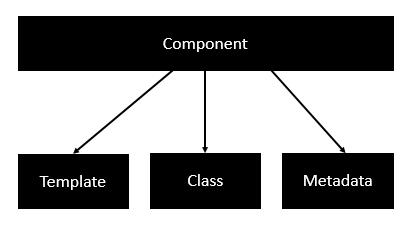
A component consists of −
- Class − This is like a class defined in any language such as C. This contains properties and methods. This has the code which is used to support the view. It is defined in TypeScript.
class classname { Propertyname: PropertyType = Value }- Metadata − This is used to decorate the class and extend the functionality of the class.
- Template − This is used to render the view for the application. This contains the HTML that needs to be rendered in the application. This part also includes the binding and directives.
template: ''{{appTitle}}
To Tutorials Point
Following is an example of a component.
import { Component } from '@angular/core';

@Component ({
   selector: 'my-app',
   templateUrl: 'app/app.component.html'
})

export class AppComponent {
   appTitle: string = 'Welcome';
}
Each application will have a root angular module & others are imported in it.
Following is an example of a root module.
import { NgModule }      from '@angular/core';
import { BrowserModule } from '@angular/platform-browser';
import { AppComponent }  from './app.component';

@NgModule ({
   imports:      [ BrowserModule ],
   declarations: [ AppComponent ],
   bootstrap:    [ AppComponent ]
})
export class AppModule { }
Following is an example of a component.
import { Component } from '@angular/core';

@Component ({
   selector: 'my-app',
   templateUrl: 'app/app.component.html'
})

export class AppComponent {
   appTitle: string = 'Welcome';
}
import { Component } from '@angular/core';

@Component ({
   selector: 'my-app',
   templateUrl: 'app/app.component.html'
})

export class AppComponent {
   appTitle: string = 'Welcome';
}
*ng-if
import { Component } from '@angular/core';

@Component ({
   selector: 'my-app',
   templateUrl: 'app/app.component.html'
})

export class AppComponent {
   appTitle: string = 'Welcome';
   appStatus: boolean = true;
}
{{appTitle}} Tutorialspoint
*ng-for
import { Component } from '@angular/core';

@Component ({
   selector: 'my-app',
   templateUrl: 'app/app.component.html'
})

export class AppComponent {
   appTitle: string = 'Welcome';
   appList: any[] = [ {
      "ID": "1",
      "Name" : "One"
   },

   {
      "ID": "2",
      "Name" : "Two"
   } ];
}
 *ngFor = 'let lst of appList'>


{{lst.ID}}
These are decorators at the class level. This is an array and an example having both the @Component and @Routes decorator
DATA BINIDNG
DATA BINIDNG
export class className {
   property: propertytype = value;
}
Comments
Post a Comment