WIRING VIEWS
STEP 1
STEP 2
include ng-route.js
STEP 3
create route.js
angular.module('RouteModule',['ngRoute'])
.config(['$routeProvider',function($routeProvider){
$routeProvider.when('/notes',{
templateUrl:'',
controller: function($http){
var notes = this;
$http({
method:'GET',
url: '/notes'
}).success(function(data{
notes.data = data
})
},
controllerAs: aliasname
})
when('/noteworthy',{
controller: ['$http','$routeParams',function($http,$routeParams){
var notes = this;
$http({
method:'GET',
url: '/notes/'+$routeParams.id
}).success(function(data{
notes.data = data
})
},
}).
when('/notes',{
}).
otherwise({
redirectTo:
})
}])
angular.module('NoteWrangler', ['ngRoute'])
.config(['$routeProvider', function($routeProvider) {
  $routeProvider

    .when('/notes', {
      templateUrl: 'templates/pages/notes/index.html'
    })
    .when('/users', {
      templateUrl: 'templates/pages/users/index.html'
    })
  .when('/notes/new', {
      templateUrl: 'templates/pages/notes/edit.html'
    })
  .when('/', {
      redirectTo: '/users'
    })
  .otherwise( {
      redirectTo: '/notes'
    })
    ;

}]);
LOGIC IN ROUTES

$http({
method:'POST',
url:'/resource/path.json',
data: noteData
})
.when('/notes', {
templateUrl: 'templates/pages/notes/index.html',.when('/notes', {
controller: function($http) {
var donkey = this; // closes over 'this'
$http({method: 'GET',
url: '/notes'}).success(function(data) {
donkey.notes = data;
});
},
controllerAs: 'notesCtrl'
})
angular.module('NoteWrangler')
.controller('NotesShowController', ['$http','$routeParams',function($http,$routeParams) {
var notes = this;
$http({method:'GET',
url: '/notes/' + $routeParams.id}).success(function(data){
notes.note = data;
});
}]);

DIRECTIVES WITH SCOPE
Level 2 $scope
angular.module('NoteWrangler').directive('newCard',function(){
return{
restrict:"E",
templateUrl:"templateUrl/directives/nw-card.html"
}
})

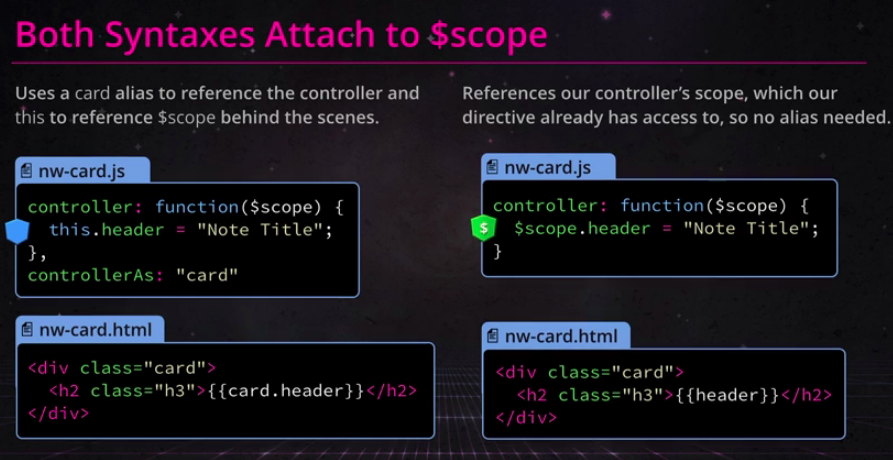
When using the
{{header}}
controllerAs syntax, the controller's context ( this) attaches things to the current scope behind the scenes.{{header}}
{{description}}
________________________________________________________
angular.module('NoteWrangler').directive('nwCard', [function() {
return {
restrict: 'E',
templateUrl: 'templates/directives/nw-card.html',
controller: function($scope) {
$scope.header = 'Note Title';
$scope.description = 'A lovely note description.';
}
};
}]);
________________________________________________________
angular.module('NoteWrangler')
.controller('NotesIndexController', ['$http','$scope', function($http,$scope) {
  $http({method: 'GET', url: '/notes'}).success(function(data) {
    $scope.notes = data;
  });
}]);
route.js
angular.module('NoteWrangler', ['ngRoute'])
.config(['$routeProvider', function($routeProvider) {
$routeProvider
.when('/', {
redirectTo: '/users'
})
.when('/notes', {
templateUrl: 'templates/pages/notes/index.html',
controller: 'NotesIndexController',
controllerAs: notesCtrl ===removed
})
.when('/users', {
templateUrl: 'templates/pages/users/index.html'
})
.when('/notes/new', {
templateUrl: 'templates/pages/notes/edit.html',
controller: 'NotesCreateController'
})
.when('/notes/:id', {
templateUrl: 'templates/pages/notes/show.html',
controller: 'NotesShowController'
})
.otherwise({
redirectTo: '/notes'
});
}]);
________________________________________________________
Scope the Config Object
Scope the Config Object
Directives by default inherit the parent's scope,i.e scope of div
in order to avoid themfrom having this issue,we need
angular.module("NoteWrangler")
.directive("directive-name",function(){
var num = i;
return{
restrict:"E",
templateUrl:"templateUrl/directives/nw-card.html",
scope:{
header:@
}
controller:function($scope){
$scope.header = "Note Title"+ num
}
}
})
Three options that comes with scope
scope:{
header:@ // one way binding
}
scope:{
header:= // Two way binding
}
scope:{
header:& // one way binding
}


angular.module('NoteWrangler')
.directive('nwCard', function() {
  return {
    restrict: 'E',
    templateUrl: 'templates/directives/nw-card.html',
    scope:{
      header:"=",
      description :"="
    }
  };
});
What is link function ?
Where is the proper place to access the HTML element within a directive?
inside link function
markdown.js
What are ngBindHtml & $sce used for
$sce: Strict


angular.module('NoteWrangler') .directive('nwCard', function() { return { restrict: 'E', templateUrl: 'templates/directives/nw-card.html', scope:{ header:"=", description :"=" } }; });
<div class="card" title="{{header}}">
  <h2 class="h3">{{header}}</h2>
  <p>{{description}}</p>
</div>
<div class="users-wrapper">
  <h1>Users</h1>

  <div class="users-wrapper">
    <a class="card-users" ng-repeat="user in users">
      <nw-card header ="user.name" description="user.bio"></nw-card>
    </a>
  </div>
</div>
What is link function ?
Where is the proper place to access the HTML element within a directive?
inside link function
- Link function runs after the directive has been complied & linked up
- Its a perfect place to manipulate DOM elements
markdown.js
What are ngBindHtml & $sce used for
$sce: Strict


_______________________________________________________
What does a service do ?
They hold functions
- responsible for connecting & fetching data
- sharing it across our application
They can be used within
- controller
- service
- directive
- filter
They can be created using 5 recipes
- value
- Factory//used for sharing functions and objects across application
- Service
- Provider//used for sharing methods and objects,but allows configuration
- Constant
Creating a Factory
.factory("Note",[function NoteFactory() {
}])
Populating a Factory
angular.module('NoteWrangler')
.factory('Note', ['$http',function NoteFactory($http) {
return  {
    all:function(){
      return   $http({method: 'GET',
              url: '/notes'});
   }
   };
}]);
Calling a FactoryService
- Injecting factory
- call its/get/post/put/delete/update call accordingly
angular.module('NoteWrangler')
.controller('NotesIndexController', ['$scope', 'Note', function($scope, Note) {
  Note.all().success(function(data){
    $scope.notes = data;
  });
}]);
Calling a FactoryService


==================================================================
Why this is correct?
HASHIFY : CRYPTO.JS
http://crypto-js.googlecode.com/svn/tags/3.1.2/build/rollups/md5.js
CRYPTOJS.MD5(email)


angular.module('NoteWrangler') .controller('NotesIndexController', ['$scope', 'Note', 'Tweetable', function($scope, Note, Tweetable) { Note.all().success(function(data) { $scope.notes = data; }); $scope.tweetThatNote = function ( desc ) { Tweetable( desc ).success(function(data, status, headers, config) { console.log( data ); }); }; }]); angular.module('NoteWrangler') .factory("Tweetable", function TweetableFactory($http){ return function(potentialTweet) { var url = "http://gentle-spire-1153.herokuapp.com/tweet"; return $http({method:'POST', url: url, data: {description:potentialTweet}}); }; });
WHY USE PROVIDERS TO BUILD A FACTORY ?

Providers make services configurable
SYNTAX
.provider("SERVICE NAME",function <SERVICE NAME>Provider(){
this.$get = function($http){};
});


angular.module('NoteWrangler')
.provider('Tweetable', function TweetableProvider() {
  var characterLength = 144;

  this.setLength = function(maxLength) {
    characterLength = maxLength;
  };

  this.$get = function($http) {
    return function(potentialTweet) {
      return $http({
        method: 'POST',
        url: 'http://gentle-spire-1153.herokuapp.com/tweet',
        data: {
          description: potentialTweet,
          maxLength: characterLength
        }
      });
    };
  };
});
angular.module('NoteWrangler')
.provider('Tweetable', [ function TweetableProvider() {
var characterLength = 144;
this.setLength = function(length){
this.characterLength = length;
};
this.$get = function($http){
return function(potentialTweet) {
return $http({
method: 'POST',
url: 'http://gentle-spire-1153.herokuapp.com/tweet',
data: {
description: potentialTweet,
maxLength: characterLength
}
});
};
};
}]);
__________________________________________________________________
$resource
angular-resourse.js


- angular-resource.js
angular.module('NoteWrangler')
.factory('Note', ['$resource', function NoteFactory($resource) {
return $resource("/notes",{},{});
}]);
angular.module('NoteWrangler')
.controller('NotesIndexController', ['$scope', 'Note', 'Tweetable', function($scope, Note, Tweetable) {
$scope.notes = Note.query();
$scope.tweetThatNote = function(noteToTweet) {
Tweetable(noteToTweet).success(function(status) {
console.log(status);
});
};
}]);
Comments
Post a Comment